
Why does TikTok keep logging me out? This is one question that every other TikTok user is asking today. If you are also being logged out of your TikTok account again and again, then this article is for you. I will tell you why does TikTok keep logging you out and how to resolve the issue in today’s article. So come along!
TikTok users’ day seems incomplete without scrolling through the feeds, but for the past two-three days, users are facing some issues with their TikTok app. Users are complaining that they are being logged out of their accounts again and again. This issue with the app is driving every TikTok user who is facing the issue crazy, as they are not able to post anything new on their accounts.
So without further ado, let’s jump into the article and learn why does TikTok keep logging me out. Why wait, then? Let’s begin!
In This Article
Why Does TikTok Keep Logging Me Out? [Update July 2023]

TikTok keeps logging you out of your account if it finds that someone else is trying to remove an active device from the app settings. This means when TikTok feels that your account is compromised, it keeps logging the users out of your account to prevent any misuse of your account and save your account from being hacked.
If you find that TikTok is logging you out again and again, it is an indication that TikTok has noticed suspicious activity on your account. In such a case, without even wasting a second, change your password to secure your account once again.
Apart from this one reason, there can be other reasons that can result in TikTok keep logging me out error. And other possible reasons for this error are:
1. A bug or glitch in TikTok app.
2. You are using an outdated version of the app.
3. Your TikTok account is logged in on multiple devices.
4. Piled up cache.
5. Using a VPN.
6. TikTok server is down.
7. Poor internet connection.
How to Fix TikTok Keep Logging Me Out?

Now that you know all the possible reasons, it is time to look at the fixes that will help you to resolve the TikTok keep logging me out error.
1. Fix TikTok Keep Logging Me Out By Checking Your Account Security
One of the main reasons why TikTok keeps logging you out of your account is due to some suspicious activity noticed on your account. As stated above, if TikTok finds that your account is compromised, TikTok logs out the user to save your account from being hacked or prevent any misuse of your content.
In such a case, you should check your account security. To check who logged in to your TikTok account previously, you need to follow the steps stated below:
Step 1: Open TikTok app.
Step 2: Log in to your account.
Step 3: Tap on me icon at the bottom-right corner of the screen.
Step 4: Tap the Settings icon in the top right corner of the screen.
Step 5: Tap on Privacy & Safety.
Step 6: Tap on Personalization & Data.
Step 7: Tap on Download your data.
Step 8: Now tap on Request data.
And with this, you are done. This is how you can check your account security. When you tap on Request data, you will get a ZIP file that contains your account data, including profile activity. The ZIP file will take some time to get downloaded. It will take anywhere from a few hours to 48 hours.
2. Fix TikTok Keep Logging Me Out By Updating TikTok App
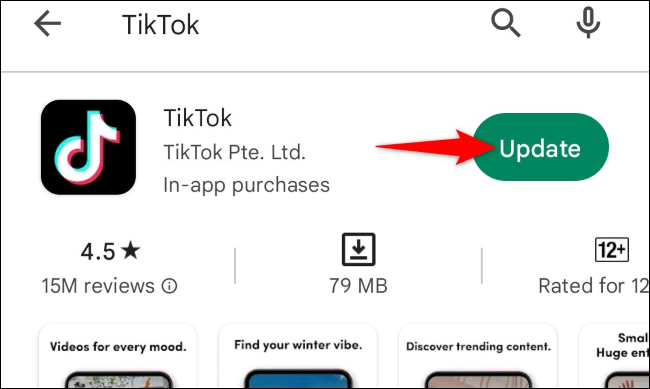
If you have been using an outdated version of the TikTok app, it can also result in errors like TikTok keep logging me out. In such a case, you should look for the available update and update your app to the latest version. If the issue is caused due to using an outdated version app, it will resolve the issue for you.
3. Fix TikTok Keep Logging Me Out By Clearing TikTok App Cache
Piled-up cache in your device memory can be the other reason your TikTok app is logging you out of your account again and again. So clearing up the cache every time you face such an issue is something you should try.
To clear the app cache, you need to follow the steps stated below:
Step 1: Go to Settings.
Step 2: Locate Apps option.
Step 3: Tap on Apps Management.
Step 4: Look For TikTok.
Step 5: Tap on it and head to storage.
Step 6: Select Clear Data.
Step 7: Now tap on Clear Cache.
And you are done! This is how you can clear the TikTok app cache.
4. Fix TikTok Keep Logging Me Out By Uninstalling and Reinstalling TikTok app

If the problem is not resolved even after clearing the cache and there is no available update in the play store or app store, then you should go for reinstalling your app to fix the issue. For this, first, uninstall the existing TikTok app, then download it again from the play store or app store. And this will surely fix the issue for you.
5. Fix TikTok Keep Logging Me Out By Removing Third Party Access of TikTok
If you are using any third-party app that requires you to log in with TikTok credentials, then you should immediately remove its access to your TikTok account. Third-party apps are often not safe to use as they require you to login in with your TikTok account, and you even need to share your password. There are high chances for your account to be compromised.
6. Fix TikTok Keep Logging Me Out By Changing TikTok Password
If you at any point in time feel suspicious about your account being compromised, you should immediately change your account password and secure your account. Even if you have been using any third-party app which requires you to log in with a TikTok account, remove the access and change your password as soon as possible. After changing the password, try to log in and see if TikTok log you out again.
7. Fix TikTok Keep Logging Me Out By Checking Your Account Status
If your account is being disabled by TikTok for violating their community guidelines, this can also be one of the reasons why TikTok keeps login you out. If you find a banner notification every time you try to load the feed, this shows that your account is being disabled. If there is a banner notification notifying you that your account is disabled, you can submit an appeal.
8. Fix TikTok Keep Logging Me Out By Disabling VPN

Using VPN while accessing TikTok app on your device is another reason that can result in TikTok keep logging you out. So to avoid being logged out of your account again and again, you should try using TikTok after disabling VPN.
9. Fix TikTok Keep Logging Me Out By Checking the Internet Connection
The other common reason for TikTok keeps logging me out error can be due to poor internet connectivity. Therefore you should check your Internet speed using any online tool like Speedtest. If you find that the speed is slow, try to connect with a stable connection. But if your internet connectivity is all good, you should proceed to the next fix.
10. Fix TikTok Keep Logging Me Out By Checking TikTok Server Status

If your Internet connectivity is all good, but still the issue persists, you should check if the TikTok server is down. This is a normal thing to happen and can result in TikTok keep logging me out error.
To check this, you can use online tools like DownDetector. After checking the status of the TikTok server, if it shows that the server is down, you have to wait until the issue is fixed from the back end. But if everything seems okay and you are still facing the problem, you should try the next fix.
11. Fix TikTok Keep Logging Me Out By Waiting For Sometime
If you find that everything is all right at your end, neither your account is compromised, nor the servers are down, then the issue must be due to a bug or glitch. If the case is so, then you can’t do much on your end, and now, after clearing the cache and reinstalling the app, you should wait for at least 24 hours before trying to log in.
12. Fix TikTok Keep Logging Me Out By Contacting TikTok Support Team

If, even after trying all the above fixes and waiting for a considerable time, TikTok keeps logging you out, then the last thing that you can try is to contact TikTok for support. You can write them in the mail or report the matter directly from your TikTok account.
Wrapping Up
With this, I come to the end of this blog, and I hope you now know why does TikTok keep logging me out. After looking at the reason, it would be easy for you to choose the fix to resolve the issue. So now go ahead and try these fixes out to resolve the issue of TikTok keep logging me out. And yeah, for any further queries related to TikTok, you can comment in the comments section below.
So, guys, that is it for today. Take Care! And keep following Path of EX for more such queries related to Social Media, Gaming, and Technology. Till then, Bye! Bye!